
Home / Share for replies
Not a PDF attachment. A conversation about every item.
A report sent as an attachment is where the follow-up starts: phone calls, texts and photos in five different places. Shared from ReportAI, the report is where the follow-up happens. Each person answers the items that are theirs, on the item, and you decide what is closed.
Pro & Expert. Part of Pro and Expert. The people you share with need no account and pay nothing.
What you get
Each person sees their own items
Assign items to the builder, a trade, the owner or an engineer. A responder sees only what is assigned to them; a viewer can see everything.
Replies with evidence
Notes, photos and voice notes, right on the item, with In progress and Fixed so you know where each one stands.
No account needed to reply
They open the report from the email and answer. Signing up only lets them see every report shared with them in one place.
You stay the one who decides
Approve, approve with conditions, not approved, or reopen. Decisions stay private until you press Send updates.
Plans with status-coloured pins
Add drawings to the shared report, pin items on them, measure once a scale is set, and issue a new revision with the pins carried over.
Told, not chased
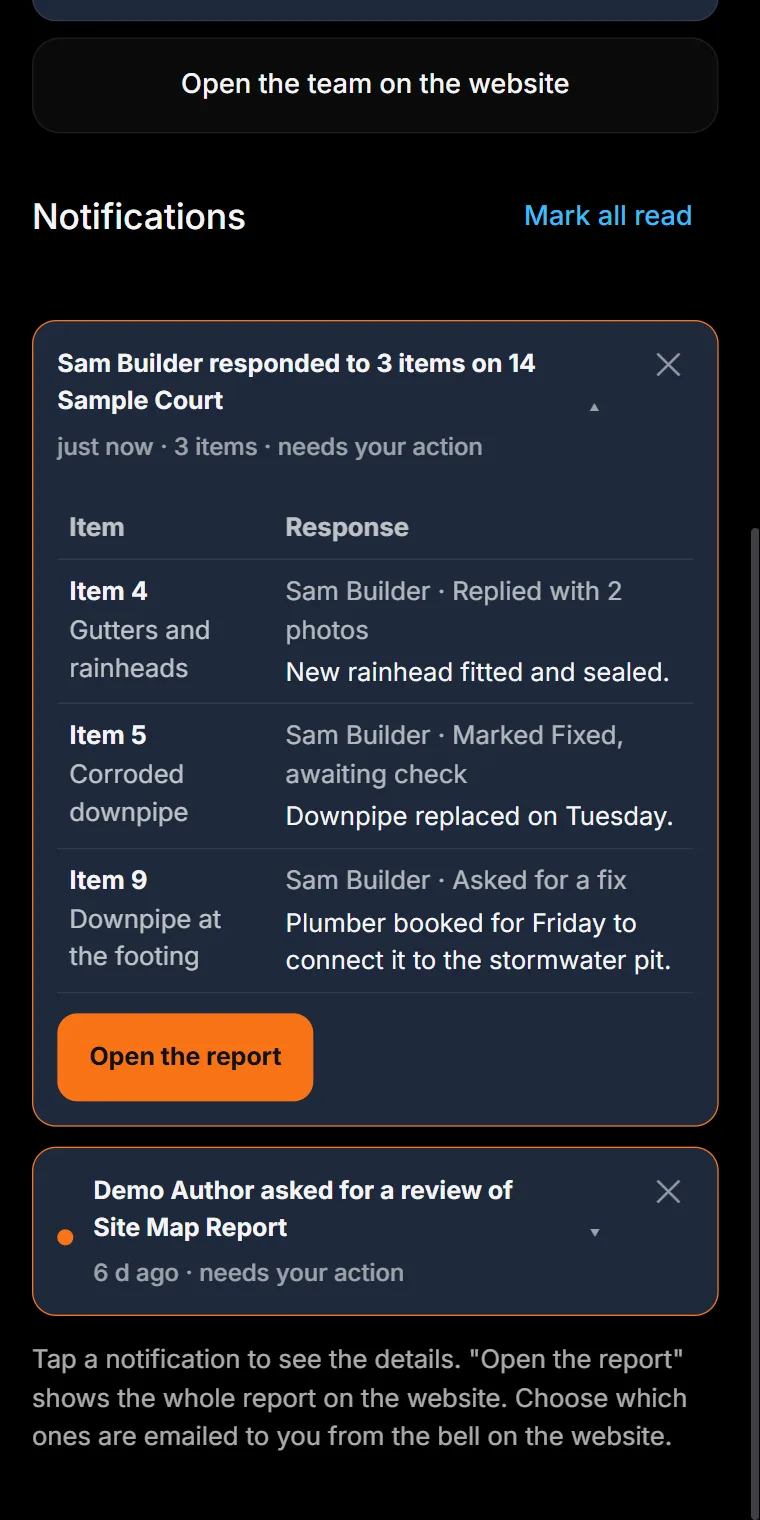
Replies arrive as a notification on your phone and by email, opening into an item-by-item table.
How it works
- Tap Share for responses on any report in the field app or on the website.
- Add the people, and assign each item to the right person.
- They reply on their items with notes, photos and Fixed.
- You approve, add conditions or reopen, then press Send updates.
Made for
Builders fixing defects · Owners and clients · Trades and subcontractors · Engineers giving advice · Strata managers · Handover punch lists
Questions
Do the people I share with need an account?
No. Builders, trades and owners open the report from the link in their email and reply without signing up. Signing up lets them see every report shared with them in one place.
Can each person see the whole report?
You choose. A responder sees only the items assigned to them, with their photos, pins and events; a viewer, or someone given all items, sees everything. The link alone shows nothing.
Which plan do I need?
Sharing a report for replies is part of Pro and Expert. On a free account it is shown locked. You can still send any report as a PDF on the free plan.
How do I know when someone replies?
You get a notification on your phone and an email, and the notification opens into a table of every item they answered.
Who decides when an item is closed?
You do. A responder can mark an item Fixed; only the inspector approves it, approves it with conditions, marks it not approved or reopens it.
More from ReportAI
- Site map reports (Free): Each finding pinned on a real street or aerial map, inside the work area you outline.
- Condition reports (Free): Rate every element area by area, Good to Damaged, with a photo and a comment where it matters.
- Site walk reports (Free): Walk the site and add a stop wherever you find something. No plan, no map, no setup.
- Defect reports on a plan (Free): Numbered directional pins on your floor plan, with severity, photos, notes and the call you made.
- Share for replies (Pro & Expert): The builder, owner and trades answer their items with notes and photos. Replies come back item by item.
- Online bookings (Pro & Expert): Your own booking page: real free times with travel planned in, prices by the hour, deposits by card.
What is free · Pricing · Start free
Home · What is ReportAI · For homeowners · For builders · Expert witness reports · For organisations · Savings calculator · Pricing · FAQ · About · Find an inspector · Field notes · Contact · Create an account · Sign in · Terms · Privacy · Refunds
reportai.au is a report documentation tool. It does not carry out inspections, does not assess or certify the condition of any building, and does not provide engineering services. Reports are AI-assisted drafts prepared for the inspecting engineer to check, correct, and sign off. All professional judgement remains yours.
Aiman Salem, trading as ReportAi.au · ABN 95 973 765 172 · admin@reportai.au · Prices in Australian dollars.