
Home / Condition reports
Rate every element, room by room.
Walk the property area by area and rate each element with one tap: Good, Fair, Poor or Damaged, or Not applicable and Not inspected. Add a photo and a comment where it matters. The report is built from your ratings, so nothing is retyped at the desk.
Free. Free in the field app. The AI-written report is part of Pro and Expert.
What you get
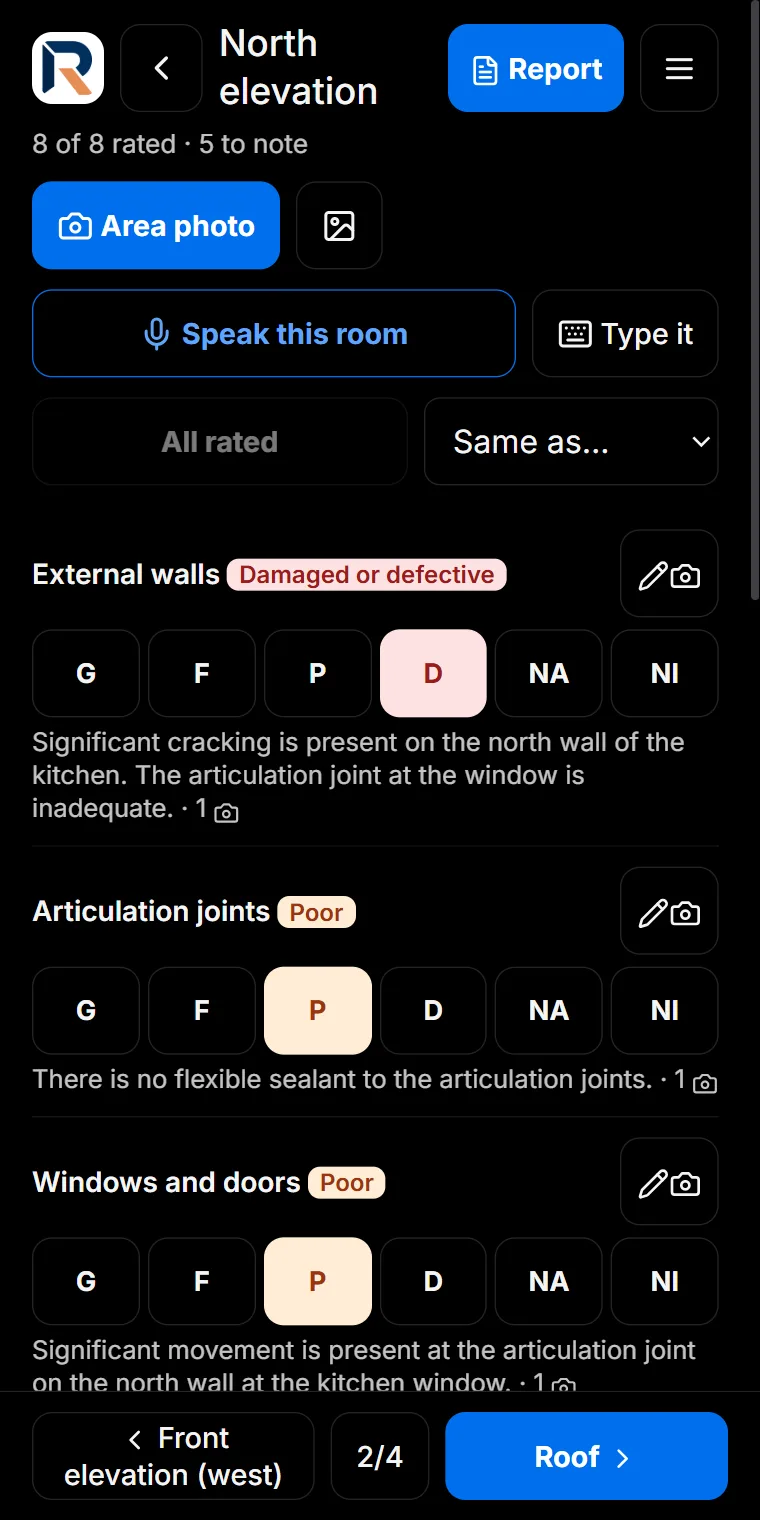
One tap per element
G, F, P, D, NA and NI buttons sized for a thumb, with the rating colour carried into the report.
Presets that fit the job
Start from a list for rentals, handovers, dilapidation and more, then add or remove elements and areas.
Same as the last room
Copy the ratings from another area and change only what is different.
A photo and a comment where it counts
Area photos and element photos, each with its own comment, annotated with the same tools as every report.
Checked before it goes
The app flags missing photos, dates after the inspection and comments that contradict the rating.
Renters can sign online
With Pro, issue entry and exit condition reports on the website: the renter agrees item by item, comments, and signs.
How it works
- Choose a preset, or start from a blank list.
- Rate each element in each area, adding photos and comments.
- Copy ratings between similar rooms and finish faster.
- Tap Report: run the checks, then send it as a PDF.
Made for
Rental entry and exit · Pre-handover · Dilapidation · Asset condition · Strata and common property · Building elements by elevation
Open a sample report · All sample reports
Questions
Are condition reports free?
Yes. Condition reports are in the ReportAI Field App on every plan, including Free. The AI-written report is part of Pro and Expert.
Which ratings can I use?
Good, Fair, Poor, Damaged or defective, Not applicable and Not inspected, for each element in each area.
Can a renter sign the report?
Yes, with Pro: rental entry and exit condition reports on the website let the renter review each item, agree or add a comment and photo, and sign online.
Can I change the list of elements?
Yes. Start from a preset and add, rename or remove elements and areas to suit the property.
More from ReportAI
- Site map reports (Free): Each finding pinned on a real street or aerial map, inside the work area you outline.
- Condition reports (Free): Rate every element area by area, Good to Damaged, with a photo and a comment where it matters.
- Site walk reports (Free): Walk the site and add a stop wherever you find something. No plan, no map, no setup.
- Defect reports on a plan (Free): Numbered directional pins on your floor plan, with severity, photos, notes and the call you made.
- Share for replies (Pro & Expert): The builder, owner and trades answer their items with notes and photos. Replies come back item by item.
- Online bookings (Pro & Expert): Your own booking page: real free times with travel planned in, prices by the hour, deposits by card.
What is free · Pricing · Start free
Home · What is ReportAI · For homeowners · For builders · Expert witness reports · For organisations · Savings calculator · Pricing · FAQ · About · Find an inspector · Field notes · Contact · Create an account · Sign in · Terms · Privacy · Refunds
reportai.au is a report documentation tool. It does not carry out inspections, does not assess or certify the condition of any building, and does not provide engineering services. Reports are AI-assisted drafts prepared for the inspecting engineer to check, correct, and sign off. All professional judgement remains yours.
Aiman Salem, trading as ReportAi.au · ABN 95 973 765 172 · admin@reportai.au · Prices in Australian dollars.